IAVS® One: Automatic room setup based on voice location
IAVS® One It is Laia's team that uses the voice localization provided by the ceiling- and wall-mounted microphones to decide, at any given moment, which camera and which shot to broadcast. It integrates our IP/PTZ cameras with the audio systems from Audio —Technica, Nureva, Sennheiser, and Shure —so that the studio runs on its own, without an operator.
In the previous article, we discussed how each Laia camera tracks a person using its own AI. Here, we take it a step further: what happens when there are multiple cameras in a room and a decision must be made about who to show.
This article is intended for sales teams, pre-sales teams, system integrators, and wholesalers. We explain what problem it solves, how IAVS® (software) and IAVS® One (hardware) differ, how to use the cameras, how the system relies on different sound-localization solutions, and how to configure it step by step.
What problem are we trying to solve?
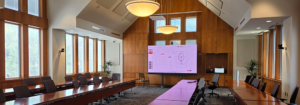
In a large room, people attending the meeting remotely usually see a fixed wide-angle shot. They can see everyone, but they don't know who is speaking. It's the same old problem in boardrooms, committee meetings, plenary sessions, and large lecture halls.
The traditional solution is to set up multiple cameras and have a director switch between shots. It works, but it requires one person per session and isn’t scalable: no one puts a technician in every meeting room at a headquarters. AI-powered tracking from a single camera helps, but it has physical limitations. At a U-shaped table with 20 people, the speaker may have their back to the camera, be blocked by another attendee, or be outside the camera’s field of view. All-in-one bar-style solutions, for example, capture the image well up to a few meters, but they aren’t suitable for a board of directors meeting.
Meanwhile, many of those rooms already have the best possible sensor for determining who is speaking: a professional ceiling- or wall-mounted microphone. Solutions from various manufacturers of audio in the industry pinpoint the voice with precision because that is their job: to accurately capture the audio. That positional information is there, but no one uses it to move the cameras.
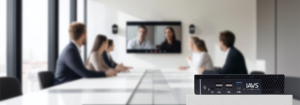
IAVS® One It does exactly that: it uses the location data already calculated by the microphone to automatically select the camera and shot. The result is a professional-quality production, just like that of a camera operator—even in rooms where there will never be one.
What is IAVS® One and what does it do?
Intelligent Audiovisual System® (IAVS®) is Laia’s solution that connects location microphones to our IP/PTZ cameras. IAVS® One (Part number SWH-IAVS/O) is the version of IAVS® that comes in a dedicated device, ready for installation in the room. It can be configured and monitored remotely from any web browser.
The process can be summarized in four steps:
- Listen. The ceiling- or wall-mounted microphone detects speech and determines where in the room it is coming from.
- Decide. IAVS® One receives that position via the network and checks whether the voice signal is maintained for the minimum time configured for that zone and, depending on the available information, whether it exceeds the threshold.
- Move. Sends a command to the assigned camera to go to its preset (via VISCA), or instructs it to follow the person using its own AI.
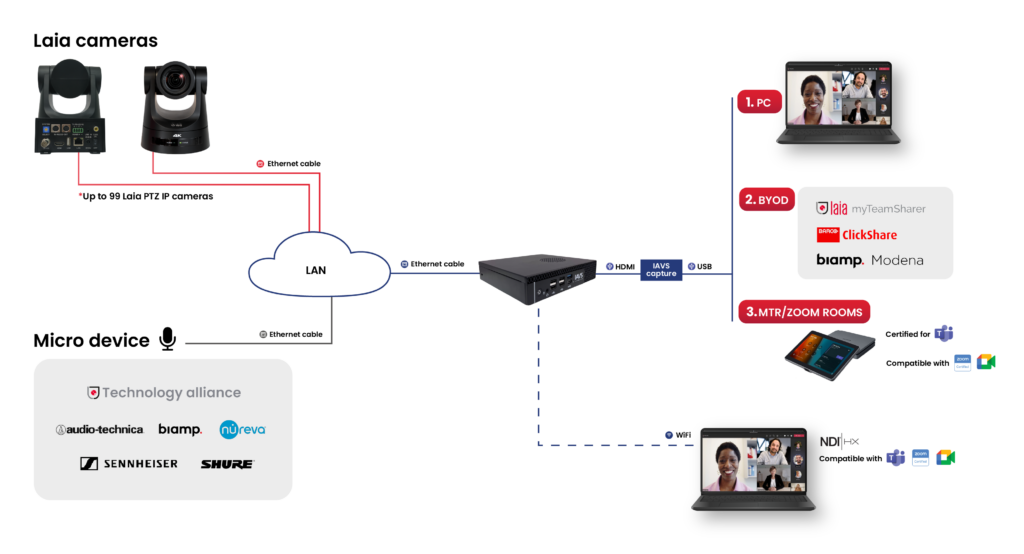
- Output. The resulting image is output via NDI® or USB (using the HDMI-USB capture card) to Teams, Zoom, Google Meet, a BYOD device, or a meeting room system.
All behavior is defined by presets: each detection zone is associated with a specific camera and shot. If no one speaks for a certain amount of time, the system returns to a wide shot.
Key figures to keep in mind:
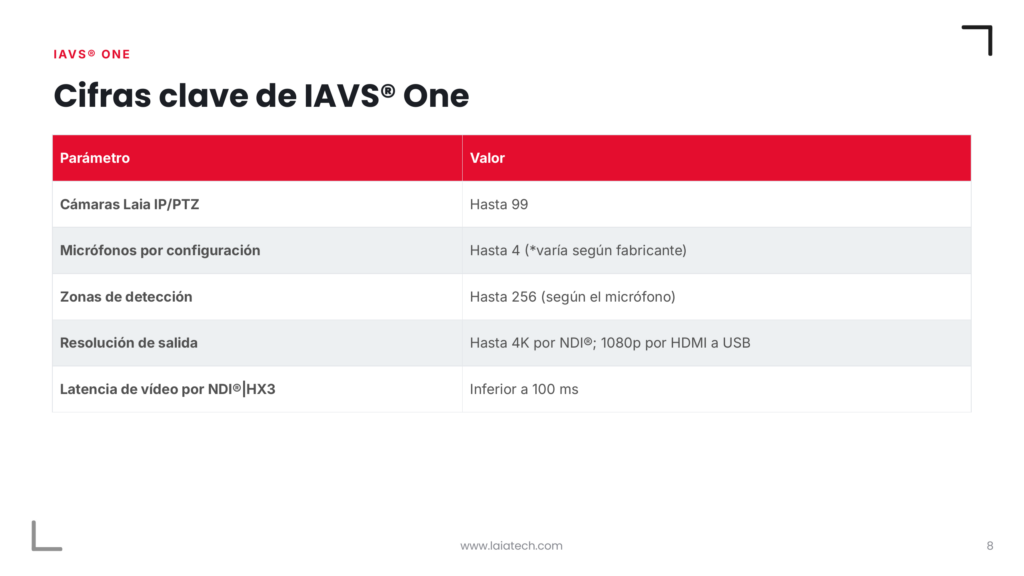
Spanish Version
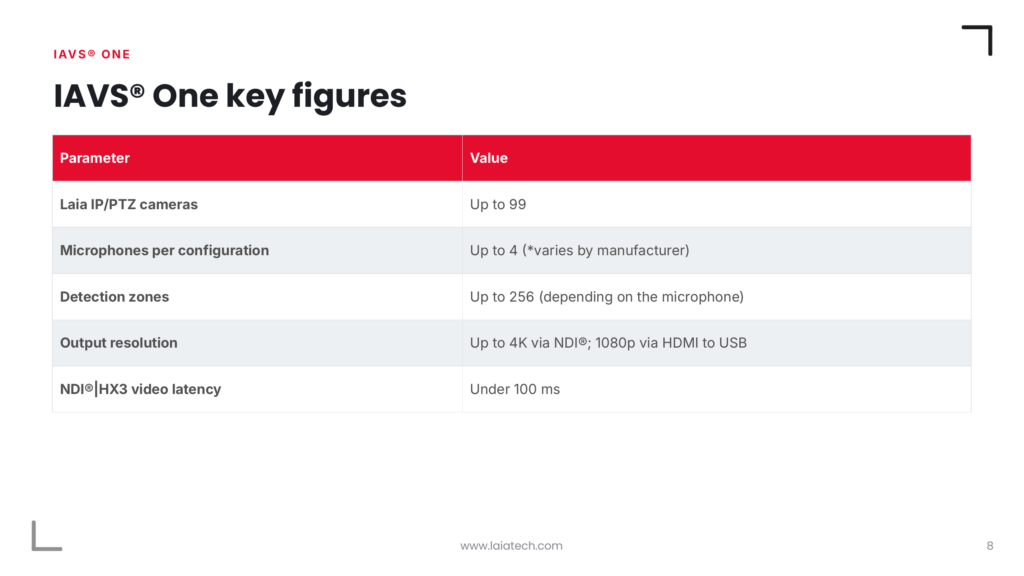
English Version
An important note: IAVS® does not affect audio. It neither receives nor forwards the audio signal to the meeting. It only uses location information to select the camera and preset. audio follows its usual path: microphone, DSP, and codec, or PC via DANTE, etc.
IAVS® e IAVS® One
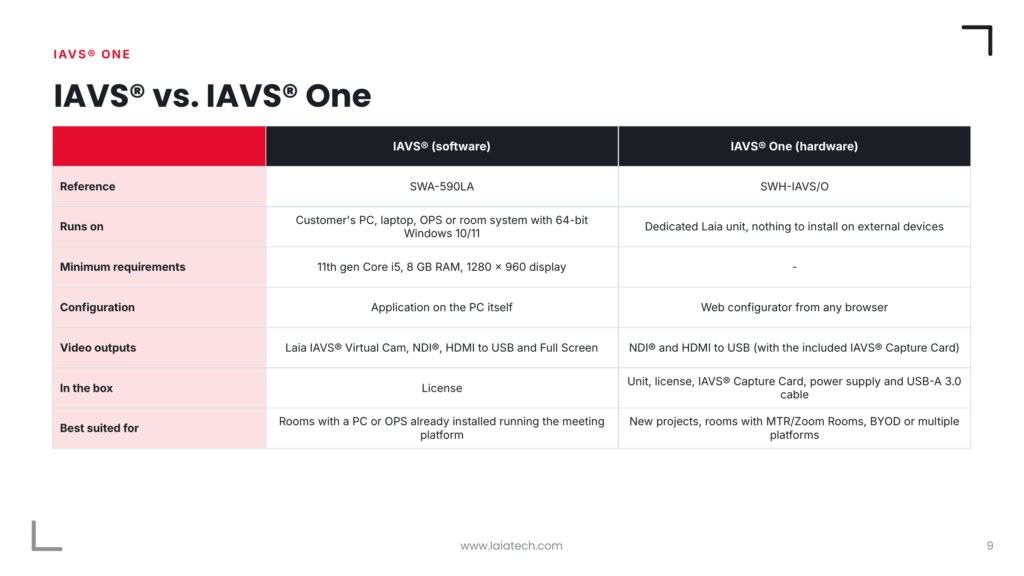
There are two versions because there are two types of projects: rooms that are being set up from scratch and rooms that already have a computer installed.
IAVS® It began as software for room PCs and OPS systems. It is still available in this form (ref. SWA-590LA), for installation on a dedicated PC or on a Windows interactive display with OPS. However, not all projects want to rely on the customer’s PC or a dedicated computer. For those projects, there is IAVS® One: the same system on its own hardware, optimized and ready to operate.
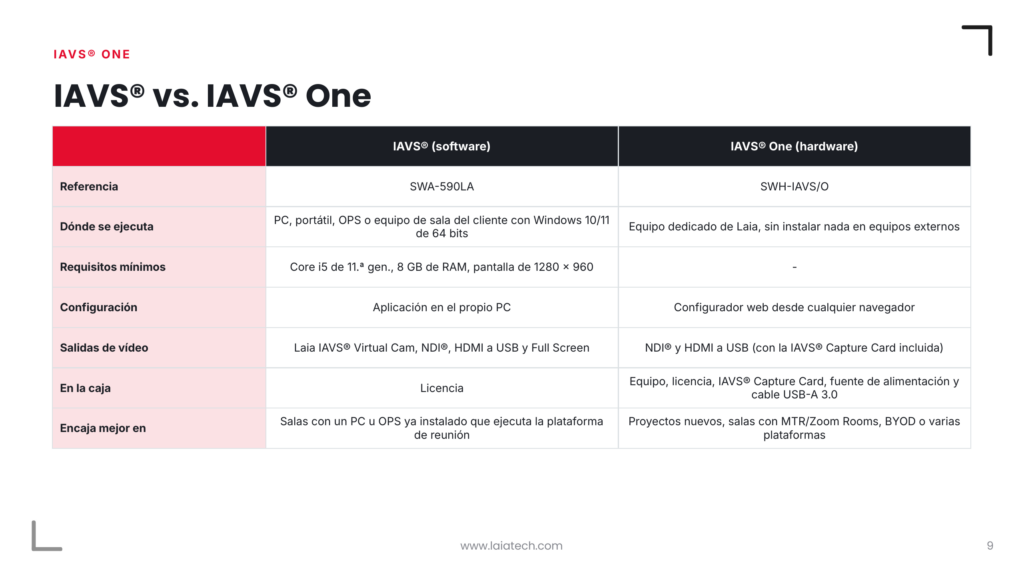
Spanish Version
English Version
The practical difference lies in the output. The virtual camera exists only in the software version, since the video conferencing application may need to run on the same computer as IAVS®. If Teams or Zoom are running on another device, the output will be NDI® or USB, and in that case IAVS® One is the natural choice.
To make the case for the sale: IAVS® One separates the meeting setup from the computer. If the customer switches PCs, platforms, or uses a BYOD system, the meeting room continues to function the same way.
Partnership Ecosystem: Technology from audio
IAVS® One It works with seven microphones from five manufacturers, all of which are part of Laia's Technology Alliance. This is a clear business advantage: the integrator does not have to change the audio that they already recommend or that the customer already has installed.
IAVS® One It supports up to four* microphones in a single configuration (depending on the manufacturer). All of them communicate with IAVS® One over the local area network (LAN). The only requirement is that the microphone and IAVS® One be on the same network and that the microphone be active and configured according to the manufacturer's instructions.
What if I already have a Laia microphone?
This is one of the questions we get asked most often, and it makes sense: if you’re already working with Laia, it’s only natural to want the entire ecosystem to communicate with each other. Today, IAVS® integration is available with the five microphone manufacturers listed above. They have the necessary audio systems so that IAVS® can receive position data and translate it into precise, automatic camera movements.
However, for small spaces—such as huddle rooms, offices, or meeting rooms with just a few people—where we don’t need more than two cameras, the answer lies in “ VoiceTrack ” technology: the camera detects who is speaking using its own array of microphones and frames the speaker without the need for additional hardware, integrations, or large-scale configuration.
All of these microphones share a common concept: they do not have a single capsule, but rather an array of several capsules. By comparing when the voice reaches each one, the processor calculates where it is coming from. Using that position, it forms a pickup beam (beamforming) that points toward the speaker and filters out the rest of the room.
Three concepts to keep in mind when speaking with a client:
- More zones, greater precision. Zones are defined around the microphone. The more zones there are, the finer the division of sound fields. A microphone with 256 zones allows you to assign a sound field to nearly every seat; one with 4 zones will be more limited.
- The human voice ranges from 60 to 70 dB, while ambient noise typically ranges from 40 to 60 dB. Therefore, when the microphone reports the level, each zone has its own trigger threshold.
- Not every sound triggers an action. A cough, a sneeze, or a chair being dragged shouldn't cause the camera to move. The "Time to trigger" parameter requires that the voice be heard for a minimum amount of time before the camera cuts to the next shot. Along with proper microphone configuration, this parameter can help us fine-tune the settings.
IAVS® and AI-powered tracking by Laia cameras
In the article “AI Tracking in Laia Cameras: Modes, Applications, and Models,” we concluded with a general principle: image-based tracking is best when the speaker’s movement is important, and voice-based tracking is best when it matters who is speaking. IAVS® One allows you to combine both in the same room.
The easiest way to understand this is to think of two layers:
- IAVS® One Decide who to look at. Based on the microphone data, choose which camera and which preset correspond to the area where the voice is coming from.
- The camera decides how to frame the shot. If you enable the "Body Tracking" option in that area, the camera will use its own AI to track the person once they enter the shot.
Here’s an example: In a large lecture hall, the areas around the presiding table are assigned to fixed presets on a Broadcaster Pro 25X. The lectern area is assigned to a C-Pro Infinity with body tracking enabled. As the members of the presiding table speak, the image switches from shot to shot without any camera movement. When the speaker steps away from the lectern and walks toward the screen, the camera follows him.
It is also important to distinguish between " IAVS® " and the " VoiceTrack " technology we discussed in the previous article. (Please explain the difference.)
For presets, everything we’ve said about the cameras still applies. Frames are saved in advance on each camera, either through its web interface or using the remote control. IAVS® One includes a shortcut button to each camera’s website, which greatly streamlines the process of readjusting shots during setup.
Outputs: How the Image Reaches the Meeting
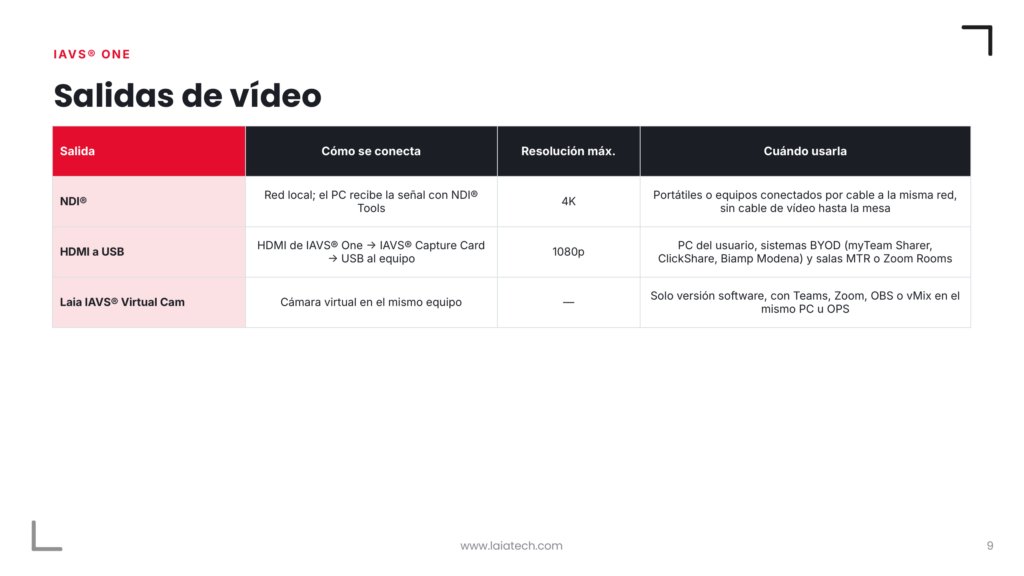
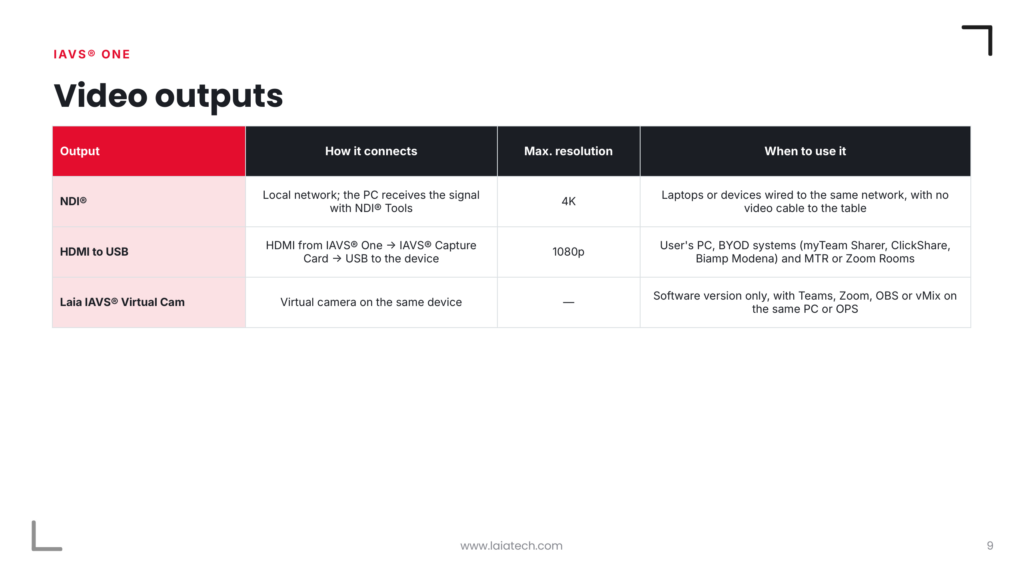
IAVS® One It offers two outputs, and the software version adds a third. The choice depends on where the video conferencing platform is running.
Spanish Version
English Version
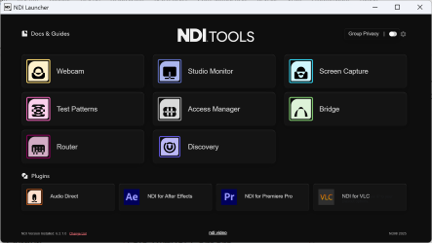
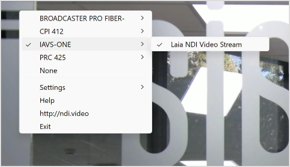
With NDI®, the video is transmitted over the network using NDI®|HX3, with high quality and less than 100 ms of latency. On your PC, simply install NDI® Tools (free), open the Webcam module, and select the source “IAVS-ONE ” (Laia NDI Video Stream), or whatever name you have configured. From there, it will appear as a camera in Teams, Zoom, or Google Meet.
Tips for Getting Started
- First, make sure the microphone is installed properly: any inaccurate data caused by the acoustic conditions of the environment will be reflected in IAVS. Communication between audio and IAVS is transparent.
- Once you've done that, adjust the settings with people in the room. The dB thresholds and times are calibrated with people speaking at a normal volume, never with the room empty.
- If the image jumps with every noise, increase the "Time to trigger" or the dB threshold for that zone. If it takes too long to react, decrease the "Time to trigger" before it reaches the threshold.
- Pay attention to the shot during the silence. Just like when a camera loses focus, the Home camera is what the remote will see during each silence. Make sure it’s a wide shot that does the room justice.
Make sure the zones cover the entire table. A seat without an assigned zone means that person will never appear in the shot. Common pre-sale questions
What do I need to ask the client to determine the scope of the project? Four things: what microphone they have or will have, how many people and seats need to be accommodated, where the meeting platform will be used (PC, BYOD, MTR/Zoom Rooms), and whether the room has multiple uses. That determines the number of cameras, the version of IAVS® , and the output.
DoesIAVS® replace the DSP or the audio processor? No. IAVS® does not process or transmit audio. The audio for the meeting is configured as usual; IAVS® only reads the voice position.
Does it work with cameras from other brands? No. IAVS® works with IP cameras manufactured by Laia, up to 99 per system.
Can the same room be used in different ways? Yes. Each project represents a different use case. A plenary hall might have one setup for debates, with fixed camera angles for each seat, and another for conferences, with the camera tracking the speaker.
What happens if no one speaks? Once the silence timeout has elapsed, the system returns to the Home camera and its preset, which is usually a wide shot.
What kind of warranty does it come with? IAVS® One is part of the Laia Plus family and comes with a free 2-year Professional Support warranty: response within 6 hours for issues, replacement within 10 days of receipt, and help desk support.
Where does it work best? In the environments listed on hoja de producto: universities, boardrooms, executive committees, and public institutions. In general, any room where several people participate from fixed seats and the remote participant needs to see who is speaking.
Support and Manuals
The manual for IAVS® One , the hoja de producto , and the rest of the documentation are available in the Support and Manuals section of the website. There you’ll also find the manuals for each camera, which are useful for preparing presets before configuring IAVS®. If you have any questions during installation, the technical support team is available at support@laiatech.com.
All product information, including the complete specifications, is available on the IAVS® page atOne.
Training at Laia Academy
If you want to confidently set up IAVS® demos, configure rooms with multiple microphones and cameras, or combine audio zones with AI tracking, we recommend Laia Academy’s certifications, which are designed for sales teams, pre-sales teams, integrators, and wholesalers.